

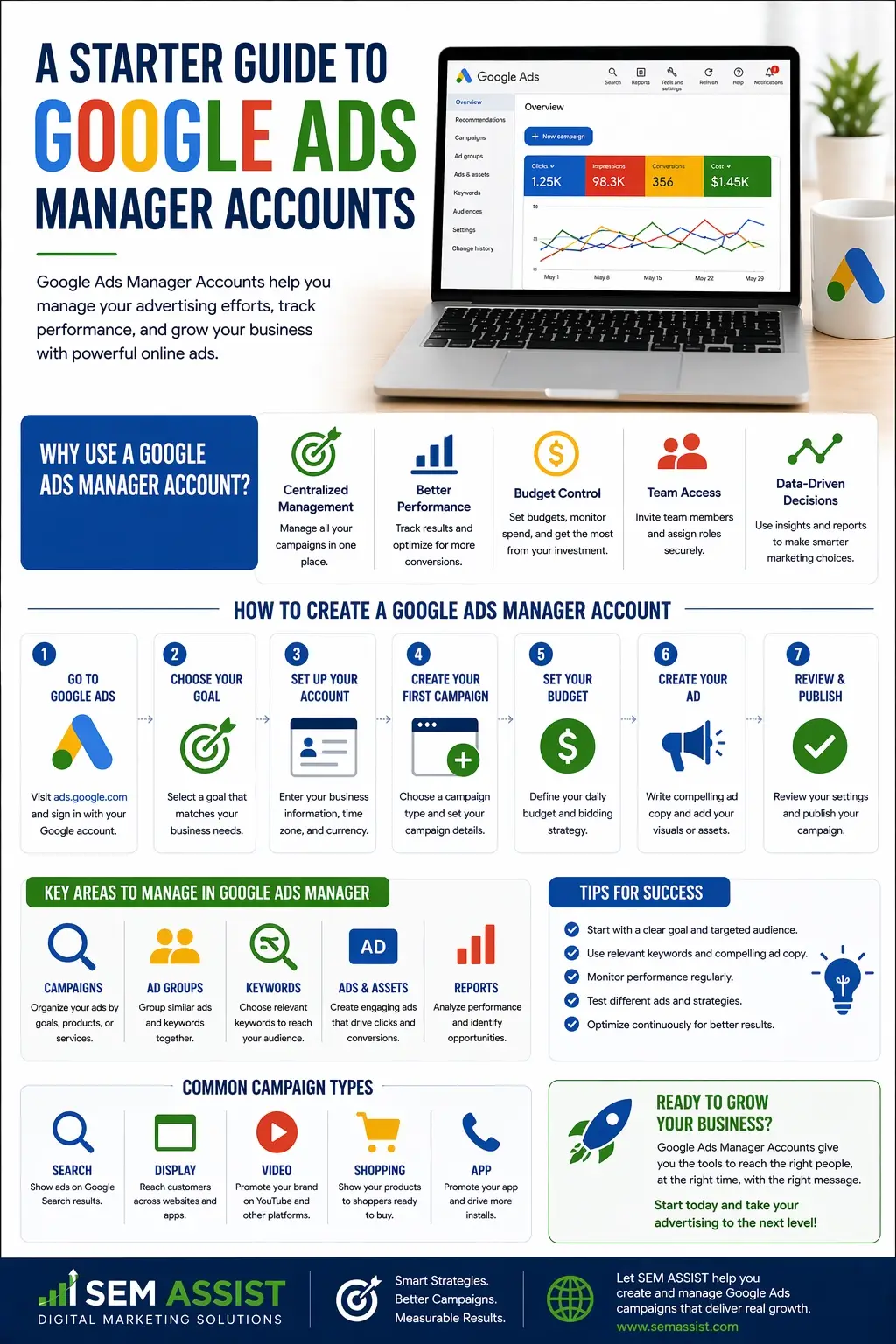
A Starter Guide to Google Ads Manager Accounts

A Starter Guide to Google Ads Manager Accounts

A Starter Guide to Google Ads Manager Accounts

Managing multiple advertising accounts can quickly become overwhelming, especially for agencies or businesses handling several brands. That is where Google Ads Manager Accounts come in.

Also known as MCC accounts, Manager Accounts allow you to manage multiple Google Ads accounts from a single dashboard. Whether you are running campaigns for clients or overseeing multiple locations, this tool simplifies your workflow and gives you better control.

Here is everything you need to know to get started.


What Is a Google Ads Manager Account

A Google Ads Manager Account is a central hub that allows you to access and manage multiple individual Google Ads accounts in one place. Instead of logging in and out of different accounts, you can view performance, make updates, and monitor campaigns from a single interface.

Manager Accounts are commonly used by marketing agencies, franchises, and businesses with multiple locations.

You can explore the platform through Google Ads, where Manager Accounts provide a higher level view of all linked accounts.


Who Should Use a Manager Account

Manager Accounts are ideal for anyone managing more than one advertising account.

This includes:

  • Marketing agencies handling multiple clients
  • Businesses with several locations or departments
  • Franchises that need centralized control
  • Teams that collaborate on advertising campaigns

If you are switching between accounts frequently, a Manager Account can save time and reduce errors.


Key Benefits of Using a Manager Account

Using a Manager Account offers several advantages that improve efficiency and performance.

Centralized Management

You can view and manage all accounts from one dashboard, which eliminates the need to log in separately.

Simplified Reporting

Performance data across multiple accounts can be analyzed in one place, making it easier to compare results and identify trends.

Access Control

You can grant different levels of access to team members without sharing individual account credentials.

Scalability

As your business grows, you can add more accounts without changing your workflow.

These benefits make Manager Accounts essential for scaling advertising efforts effectively.


How to Set Up a Manager Account

Getting started is a straightforward process.

First, create a Manager Account through Google Ads using a dedicated email address. This account will act as your main control center.

Next, link existing Google Ads accounts by sending access requests. Once approved, those accounts will appear in your dashboard.

You can also create new accounts directly within your Manager Account if needed.

Organizing your accounts into groups can help keep everything structured and easy to manage.


Navigating the Dashboard

The Manager Account dashboard provides a high level overview of all linked accounts.

From this interface, you can:

  • View performance metrics such as clicks, impressions, and conversions
  • Access individual accounts for detailed campaign management
  • Monitor account health and activity
  • Adjust settings across multiple accounts

Learning how to navigate this dashboard efficiently will save time and improve your overall campaign management.


Best Practices for Managing Multiple Accounts

To get the most out of your Manager Account, it is important to follow a few key practices.

Stay Organized

Group accounts by client, location, or service type to keep your dashboard clean and easy to navigate.

Standardize Naming Conventions

Use consistent naming for campaigns and accounts so you can quickly identify what each one represents.

Monitor Performance Regularly

Review performance data across all accounts to spot trends and opportunities for improvement.

Set Clear Permissions

Assign roles carefully to ensure team members have the right level of access without compromising security.

Keeping your accounts organized and structured will make management much more efficient.


Common Mistakes to Avoid

While Manager Accounts are powerful, there are a few common mistakes to watch out for.

One mistake is failing to organize accounts properly, which can lead to confusion as you scale. Another is giving too much access to users who do not need it, which can create security risks.

Some users also overlook performance tracking at the account level, focusing too much on individual campaigns instead of the bigger picture.

Avoiding these mistakes will help you maintain control and maximize results.


How Manager Accounts Support Growth

As your advertising efforts expand, managing everything manually becomes more difficult.

Manager Accounts allow you to scale efficiently by providing a structured system for handling multiple campaigns and accounts. They give you better visibility into performance and help you make data driven decisions.

For agencies, this means managing more clients without sacrificing quality. For businesses, it means maintaining consistency across locations and campaigns.


Final Thoughts

A Google Ads Manager Account is an essential tool for anyone managing multiple advertising accounts. It simplifies workflows, improves organization, and provides valuable insights across all campaigns.

By setting up your Manager Account correctly and following best practices, you can create a strong foundation for scalable and effective advertising.

At SEM ASSIST, we help businesses and agencies streamline their advertising strategies and maximize performance across every account.


Ready to Take Control of Your Google Ads

If managing multiple accounts feels overwhelming, SEM ASSIST can help you simplify your strategy and improve results. From account setup to ongoing optimization, we provide the support you need to grow with confidence.
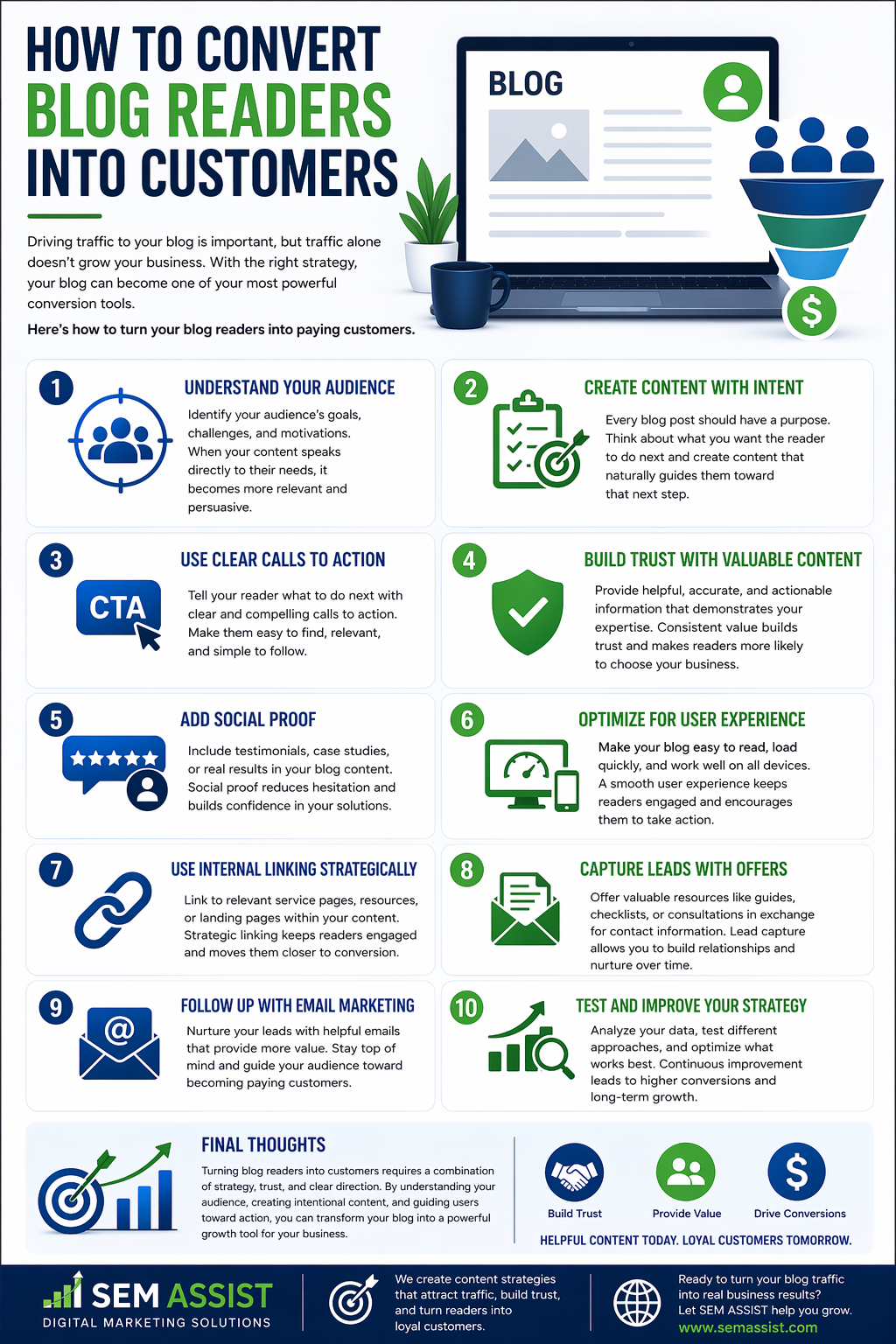
How to Convert Blog Readers Into Customers

How To Convert Blog Readers Into Customers

How to Convert Blog Readers Into Customers

Driving traffic to your blog is important, but traffic alone does not grow your business. The real value comes from turning readers into customers.

Many businesses create high quality content but struggle to convert that attention into leads and sales. With the right strategy, your blog can become one of your most powerful conversion tools.

Here is how to turn your blog readers into paying customers.


Understand Your Audience

Conversion starts with understanding who you are speaking to.

Identify your audience’s goals, challenges, and motivations. When your content speaks directly to their needs, it becomes more persuasive and relevant.

The better you understand your audience, the easier it is to guide them toward taking action.


Create Content With Intent

Every blog post should have a purpose beyond just providing information.

Think about what you want the reader to do after they finish reading. Whether it is contacting your business, requesting a quote, or learning more about your services, your content should guide them toward that next step.

Intent driven content leads to stronger results.


Use Clear Calls to Action

A call to action tells your reader what to do next.

Place clear and compelling calls to action throughout your content. This can include inviting readers to schedule a consultation, download a resource, or explore your services.

Make your calls to action easy to find and simple to follow.


Build Trust With Valuable Content

Trust is a key factor in conversion.

Provide helpful, accurate, and actionable information that demonstrates your expertise. When readers see that you understand their needs and can deliver value, they are more likely to choose your business.

Consistent value builds long term trust.


Add Social Proof

Social proof reinforces credibility.

Include testimonials, case studies, or real results within your blog content. Seeing that others have had positive experiences reduces hesitation and builds confidence.

Trust signals can make a significant difference in conversion rates.


Optimize for User Experience

A poor user experience can prevent conversions.

Make sure your blog is easy to read, loads quickly, and works well on all devices. Clear formatting and simple navigation help keep readers engaged.

A smooth experience encourages users to stay longer and take action.


Use Internal Linking Strategically

Guide readers to the next step by linking to relevant pages.

Internal links can direct users to service pages, contact forms, or additional resources. This keeps them engaged and moves them closer to conversion.

Strategic linking creates a clear path through your website.


Capture Leads With Offers

Not every reader will be ready to buy immediately.

Offer something of value in exchange for their contact information. This could include guides, checklists, or consultations.

Lead capture allows you to continue building the relationship over time.


Follow Up With Email Marketing

Once you capture a lead, follow up consistently.

Email marketing helps nurture your audience by providing additional value and staying top of mind. Over time, this increases the likelihood of conversion.

A strong follow up strategy turns interest into action.


Test and Improve Your Strategy

Conversion optimization is an ongoing process.

Analyze your data and identify what is working. Test different calls to action, content formats, and layouts to improve performance.

Continuous improvement leads to better results over time.


Final Thoughts

Turning blog readers into customers requires a combination of strategy, trust, and clear direction. By understanding your audience, creating intentional content, and guiding users toward action, you can transform your blog into a powerful growth tool.

At SEM ASSIST, we help businesses create content strategies that not only attract traffic but also drive real results.


Ready to Turn Traffic Into Customers

If you want to improve your conversions and get more value from your content, SEM ASSIST can help you build a strategy that turns readers into loyal customers.

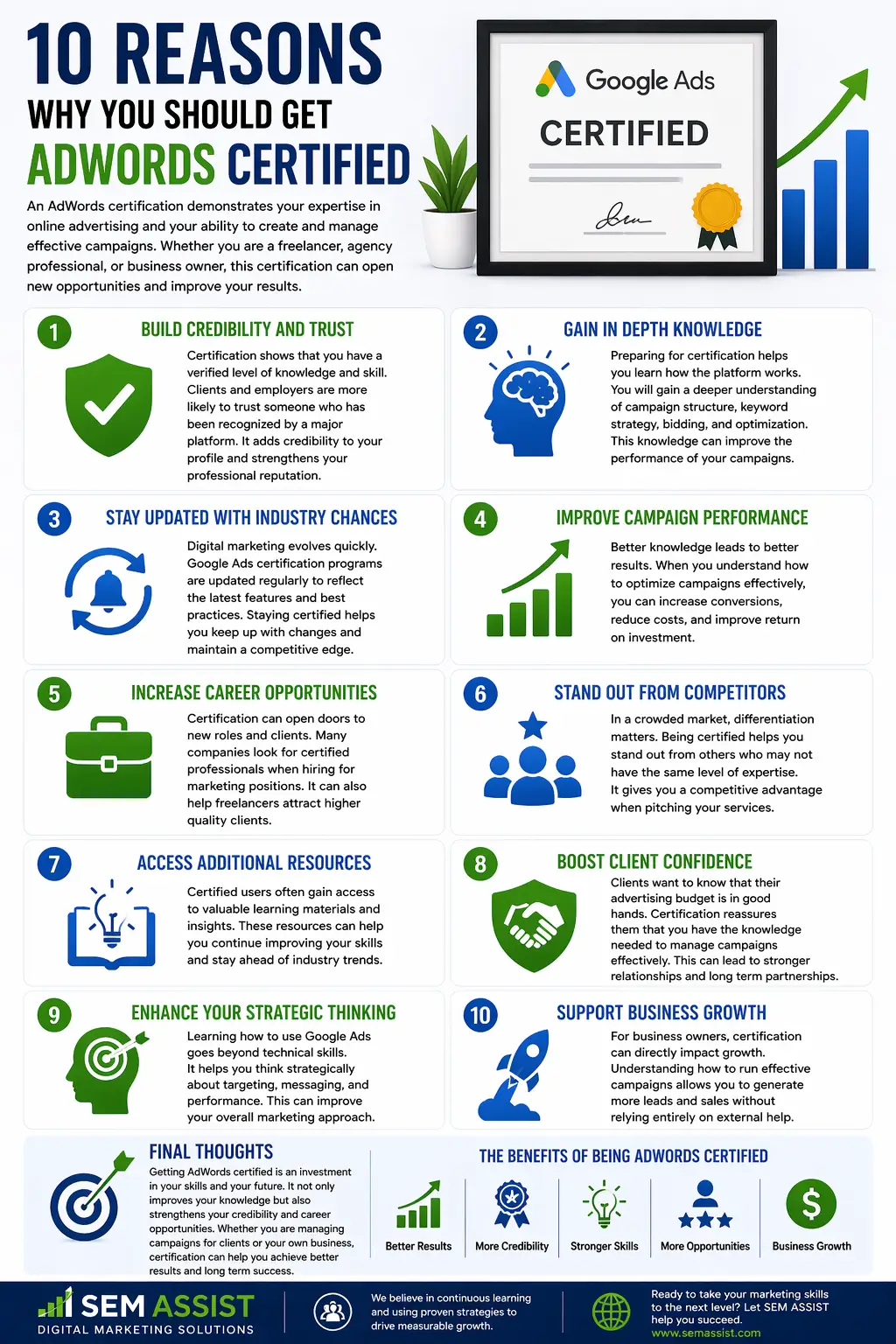
10 Reasons Why You Should Get AdWords Certified

10 Reasons Why You Should Get AdWords Certified

10 Reasons Why You Should Get AdWords Certified

In today’s competitive digital landscape, having the right skills and credentials can set you apart. One of the most valuable certifications for marketers and business owners is becoming certified in Google Ads.

An AdWords certification demonstrates your expertise in online advertising and your ability to create and manage effective campaigns. Whether you are a freelancer, agency professional, or business owner, this certification can open new opportunities and improve your results.

Here are ten reasons why you should consider getting AdWords certified.


1. Build Credibility and Trust

Certification shows that you have a verified level of knowledge and skill.

Clients and employers are more likely to trust someone who has been recognized by a major platform. It adds credibility to your profile and strengthens your professional reputation.


2. Gain In Depth Knowledge

Preparing for certification helps you learn how the platform works.

You will gain a deeper understanding of campaign structure, keyword strategy, bidding, and optimization. This knowledge can improve the performance of your campaigns.


3. Stay Updated With Industry Changes

Digital marketing evolves quickly.

Google Ads certification programs are updated regularly to reflect the latest features and best practices. Staying certified helps you keep up with changes and maintain a competitive edge.


4. Improve Campaign Performance

Better knowledge leads to better results.

When you understand how to optimize campaigns effectively, you can increase conversions, reduce costs, and improve return on investment.


5. Increase Career Opportunities

Certification can open doors to new roles and clients.

Many companies look for certified professionals when hiring for marketing positions. It can also help freelancers attract higher quality clients.


6. Stand Out From Competitors

In a crowded market, differentiation matters.

Being certified helps you stand out from others who may not have the same level of expertise. It gives you a competitive advantage when pitching your services.


7. Access Additional Resources

Certified users often gain access to valuable learning materials and insights.

These resources can help you continue improving your skills and stay ahead of industry trends.


8. Boost Client Confidence

Clients want to know that their advertising budget is in good hands.

Certification reassures them that you have the knowledge needed to manage campaigns effectively. This can lead to stronger relationships and long term partnerships.


9. Enhance Your Strategic Thinking

Learning how to use Google Ads goes beyond technical skills.

It helps you think strategically about targeting, messaging, and performance. This can improve your overall marketing approach.


10. Support Business Growth

For business owners, certification can directly impact growth.

Understanding how to run effective campaigns allows you to generate more leads and sales without relying entirely on external help.


Final Thoughts

Getting AdWords certified is an investment in your skills and your future. It not only improves your knowledge but also strengthens your credibility and career opportunities.

Whether you are managing campaigns for clients or your own business, certification can help you achieve better results and long term success.

At SEM ASSIST, we believe in continuous learning and using proven strategies to drive measurable growth.


Ready to Take Your Marketing Skills to the Next Level

If you want to improve your advertising performance and stand out in your industry, SEM ASSIST can help you develop the skills and strategies needed to succeed.