
A Starter Guide to Google Ads Manager Accounts
Managing multiple advertising accounts can quickly become overwhelming, especially for agencies or businesses handling several brands. That is where Google Ads Manager Accounts come in.
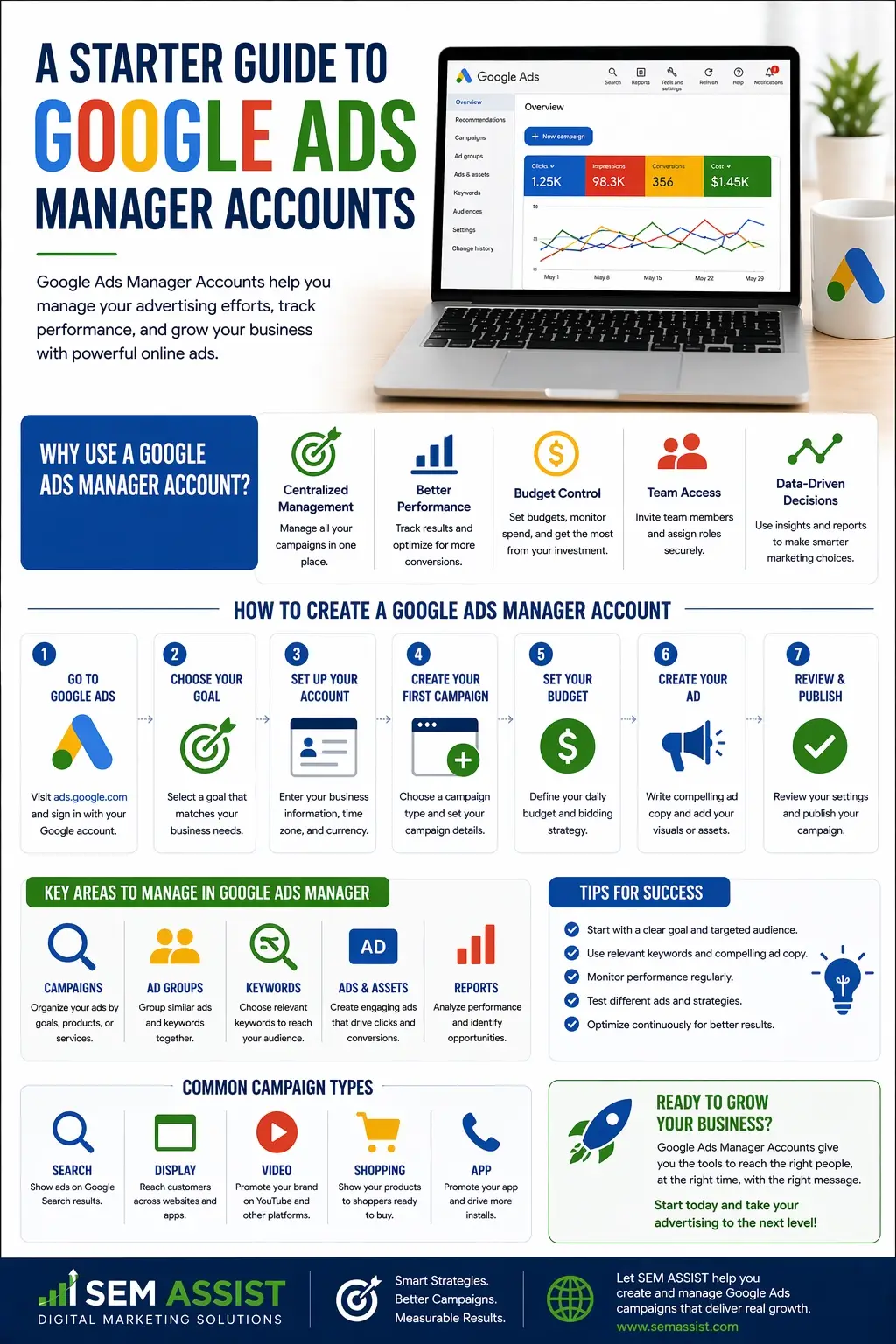
Also known as MCC accounts, Manager Accounts allow you to manage multiple Google Ads accounts from a single dashboard. Whether you are running campaigns for clients or overseeing multiple locations, this tool simplifies your workflow and gives you better control.
Here is everything you need to know to get started.
What Is a Google Ads Manager Account
A Google Ads Manager Account is a central hub that allows you to access and manage multiple individual Google Ads accounts in one place. Instead of logging in and out of different accounts, you can view performance, make updates, and monitor campaigns from a single interface.
Manager Accounts are commonly used by marketing agencies, franchises, and businesses with multiple locations.
You can explore the platform through Google Ads, where Manager Accounts provide a higher level view of all linked accounts.
Who Should Use a Manager Account
Manager Accounts are ideal for anyone managing more than one advertising account.
This includes:
- Marketing agencies handling multiple clients
- Businesses with several locations or departments
- Franchises that need centralized control
- Teams that collaborate on advertising campaigns
If you are switching between accounts frequently, a Manager Account can save time and reduce errors.
Key Benefits of Using a Manager Account
Using a Manager Account offers several advantages that improve efficiency and performance.
Centralized Management
You can view and manage all accounts from one dashboard, which eliminates the need to log in separately.
Simplified Reporting
Performance data across multiple accounts can be analyzed in one place, making it easier to compare results and identify trends.
Access Control
You can grant different levels of access to team members without sharing individual account credentials.
Scalability
As your business grows, you can add more accounts without changing your workflow.
These benefits make Manager Accounts essential for scaling advertising efforts effectively.
How to Set Up a Manager Account
Getting started is a straightforward process.
First, create a Manager Account through Google Ads using a dedicated email address. This account will act as your main control center.
Next, link existing Google Ads accounts by sending access requests. Once approved, those accounts will appear in your dashboard.
You can also create new accounts directly within your Manager Account if needed.
Organizing your accounts into groups can help keep everything structured and easy to manage.
Navigating the Dashboard
The Manager Account dashboard provides a high level overview of all linked accounts.
From this interface, you can:
- View performance metrics such as clicks, impressions, and conversions
- Access individual accounts for detailed campaign management
- Monitor account health and activity
- Adjust settings across multiple accounts
Learning how to navigate this dashboard efficiently will save time and improve your overall campaign management.
Best Practices for Managing Multiple Accounts
To get the most out of your Manager Account, it is important to follow a few key practices.
Stay Organized
Group accounts by client, location, or service type to keep your dashboard clean and easy to navigate.
Standardize Naming Conventions
Use consistent naming for campaigns and accounts so you can quickly identify what each one represents.
Monitor Performance Regularly
Review performance data across all accounts to spot trends and opportunities for improvement.
Set Clear Permissions
Assign roles carefully to ensure team members have the right level of access without compromising security.
Keeping your accounts organized and structured will make management much more efficient.
Common Mistakes to Avoid
While Manager Accounts are powerful, there are a few common mistakes to watch out for.
One mistake is failing to organize accounts properly, which can lead to confusion as you scale. Another is giving too much access to users who do not need it, which can create security risks.
Some users also overlook performance tracking at the account level, focusing too much on individual campaigns instead of the bigger picture.
Avoiding these mistakes will help you maintain control and maximize results.
How Manager Accounts Support Growth
As your advertising efforts expand, managing everything manually becomes more difficult.
Manager Accounts allow you to scale efficiently by providing a structured system for handling multiple campaigns and accounts. They give you better visibility into performance and help you make data driven decisions.
For agencies, this means managing more clients without sacrificing quality. For businesses, it means maintaining consistency across locations and campaigns.
Final Thoughts
A Google Ads Manager Account is an essential tool for anyone managing multiple advertising accounts. It simplifies workflows, improves organization, and provides valuable insights across all campaigns.
By setting up your Manager Account correctly and following best practices, you can create a strong foundation for scalable and effective advertising.
At SEM ASSIST, we help businesses and agencies streamline their advertising strategies and maximize performance across every account.
Ready to Take Control of Your Google Ads
If managing multiple accounts feels overwhelming, SEM ASSIST can help you simplify your strategy and improve results. From account setup to ongoing optimization, we provide the support you need to grow with confidence.